

Storage
Browse the SD card: copy, move, rename and delete with a clipboard, and open a file by its type.
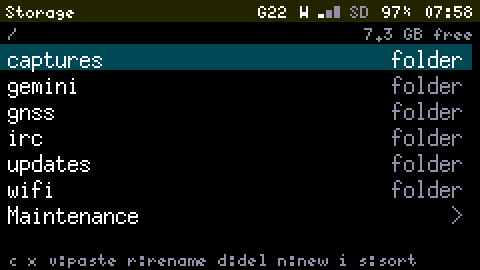
Storage shows what is on the SD card: each folder's entries with their size and date, folders first. Enter opens a folder, Back goes up, and s sorts by name, date or size. A folder with more than 256 entries shows the first 256 by name, and says so.
Working on one item
| Key | Does |
|---|---|
| c / x | Copies or cuts the selected file or folder; the footer shows what v would paste |
| v | Pastes it into the folder shown. A copy next to its original is named name (2).txt; anything in the way is asked about first |
| r | Renames |
| d | Deletes, after saying what is inside: "Delete saved and its 42 files (1.2 MB)?" |
| n | Makes a folder |
| i | Details: type, exact size, date, and why an item is read-only if it is |
A copy runs in the background of the card (about 400 KB a second), in short turns, so logs and captures keep being written. It shows its progress, Back cancels it and takes back what was copied, and each file's size is checked afterwards.
What cannot be changed
- the top-level folders the firmware keeps its files in (what is inside them can be);
/gemini/cache;- a file being written right now: today's IRC log, a Track or a capture being recorded.
The App says why when it refuses.
Opening files
Enter on a file opens it by its type, and Tab switches the same file to a hex dump or to text:
- Text (
.txt,.log,.gmi,.csv, and anything that looks like text): only a screenful is read from the card, so a file of any size opens at once, and logs open at the end. Up and down move a line, left and right a page, t and b go to the top and the end, and e edits it (up to 16 KB, as in Notes). - Captures (
.pcap): the packets as the LoRa Scanner lists them; Enter shows one with its Meshtastic header and bytes. - Tracks (
.gpx): the number of points, the start, the duration and the distance. - Update files (
.ota): the version, and whether the file would install: it is checked as an install checks it, signature and contents, without writing anything. Enter then installs it (see Updates). - Anything else: a hex dump.
Maintenance
At the top of the card, the last row, Maintenance (or m), shows the card's usage and holds Storage clean-up and Erase SD card. They delete for good, so they sit behind a warning. Clean-up deletes old logs and captures by category and age, showing the space it would free first. Notes and Saved Pages are never offered.
The firmware warns once per start when the card passes 80% full; past 90%, logs stop being written so that the rest is kept for captures.