Open firmware · GPL-3.0 · v0.11.0

Open firmware for a pocket computer.

roro9stack is firmware for the M5Stack Cardputer ADV with the Cap LoRa-1262: a LoRa scanner that reads Meshtastic traffic, GNSS, IRC, a Gemini browser, Wi-Fi tools, notes and more.

  • GPL-3.0
  • Docker-only build
  • Signed updates
SNIFFERSWEEPCAPSWL863866.5870 MHz
GNSSSKYPOSITIONNSWESNR

Drawings of the LoRa Scanner's Sweep view and the GNSS sky view, not screenshots: the real screens are further down.

Where it stands

Early software, v0.11.0. The radio listens; it doesn't transmit yet. Sending and reading mesh messages is planned and waits for a second node to test with. The milestones show what's done and what's next.

Before you start

What you need.

What's inside

Apps for the radio, the web and the card.

LoRa Scanner01

See what is on the air

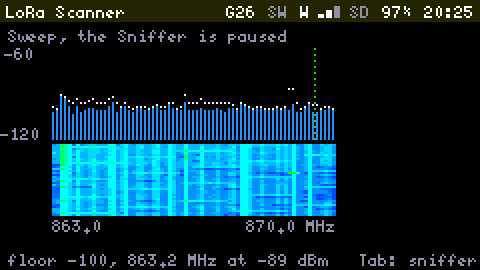
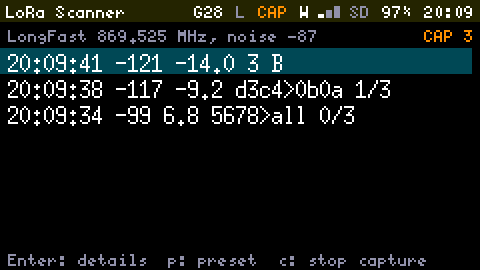
Lists every packet it hears with time, RSSI, SNR, sender and hops, reading the Meshtastic header. A Sweep shows signal strength from 863 to 870 MHz. Capture to a pcap for Wireshark.

Only listens, never transmits
GNSS02

Find your place in the sky

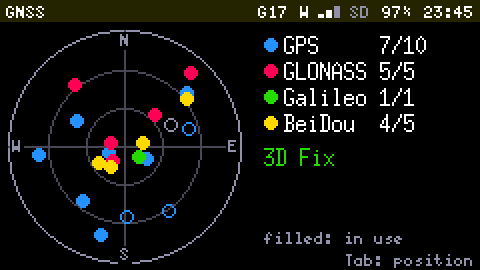
Position and Sky views show where you are and which satellites you can see. Tracks save to the SD card as GPX, and the clock follows the fix.

Sky view and GPX Tracks
Gemini03

Browse Geminispace

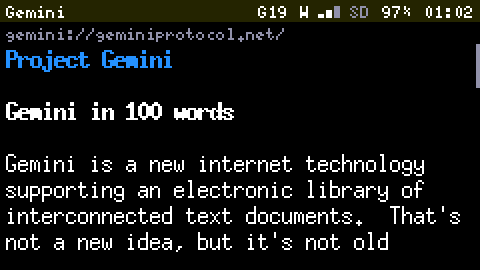
Follow links with Tab and Enter, go Back to where you were, bookmark pages and save them to the SD card to read offline.

Certificates trusted on first use
IRC04

Chat from the keyboard

Join channels and type commands as you would anywhere, with daily logs written to the SD card.

Logs to SD
Wi-Fi tools05

Scan the air for networks

See the networks around you, sort and filter the list, and log scans to a CSV file on the SD card.

Scans log to CSV
Notes06

Write it down

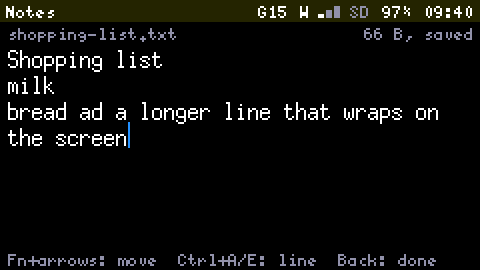
Keep plain text notes on the SD card. There is no save key: the editor writes five seconds after you stop typing, through a temporary file, so a power cut never costs the note.

Plain .txt files in /notes
Storage07

Manage the SD card

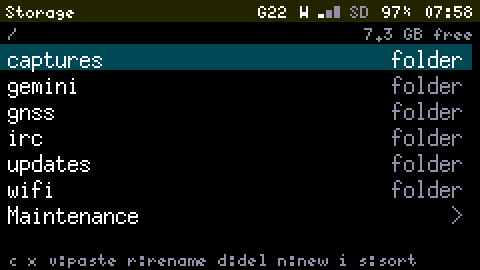
Browse, copy, cut, rename and delete with a clipboard. Copies run in the background and Back cancels one. Opens text, hex, captures, tracks and update files.

Checks every copy by size
System08

Watch it think

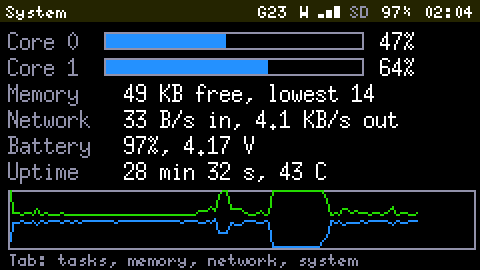
Per-core load, every task and its spare stack, free heap, network traffic, battery and chip temperature, live.

Live and read-only
Planned09

A mesh messenger

Sending and reading messages on a Meshtastic-compatible mesh. The radio listens today, in the LoRa Scanner; transmitting is the next step and waits for a second node to test with.

Milestones M4 and M5 · not built yet

Plus Settings, with its Wi-Fi and Firmware pages.

On the device

The real screens.

The LoRa Scanner's Sweep view: bars of signal strength from 863.0 to 870.0 MHz with peak marks, a waterfall under them, and a footer reading floor -100, 863.2 MHz at -89 dBm
LoRa Scanner, Sweep
The LoRa Scanner's packet list on LongFast 869.525 MHz while a Capture is recording: three packets, each with its time, RSSI, SNR and Meshtastic sender and hops
LoRa Scanner, packets
The GNSS App's sky view: a circle with the satellites of four constellations as coloured dots, and a legend counting them: GPS 7 of 10, GLONASS 5 of 5, Galileo 1 of 1, BeiDou 4 of 5, 3D Fix
GNSS, sky
The Gemini App on the page Project Gemini at geminiprotocol.net: a heading, then the start of the text, Gemini in 100 words
Gemini
The System App's overview: Core 0 at 47 percent, Core 1 at 64 percent, memory 49 KB free, network, battery 97 percent, uptime, and a graph of both cores over two minutes
System
The Notes editor on shopping-list.txt, 66 bytes, saved: Shopping list, milk, and a longer line that wraps on the screen
Notes
The Storage App at the top of the SD card: the folders captures, gemini, gnss, irc, updates and wifi, and a Maintenance row, with 7.3 GB free
Storage
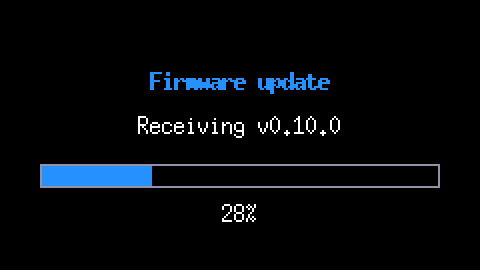
The full-screen progress of a firmware update: Receiving v0.10.0, a bar at 28 percent
A firmware update
Updates

Update over Wi-Fi. It rolls back if it fails.

Install a new release from the project's server in Settings, from the SD card, or push one from your computer. Every update is signed: the device checks the signature before it writes anything, restarts, and runs the new firmware on Probation. If it crashes, or can't reconnect Wi-Fi, it goes back to the previous firmware and says so.

$ scripts/flash.sh --ota 10.39.39.12
60 s

The longest the device waits for you to stop typing before it restarts into an update.

3 min

How long new firmware has to reconnect Wi-Fi on Probation before it rolls back.

3

Crash restarts in a row, and it starts in Safe Mode: only Wi-Fi, updates and the Debug Console, so a fix can still be pushed.

Build and flash

Only Docker needed.

PlatformIO and the ESP32 toolchain run in a container. The first build downloads about 1 GB; after that, builds take under a minute.

If the upload can't connect, hold G0, the button next to the screen, while plugging in USB, then retry.

Prefer a ready-made build? Install it from your browser, or take the factory image and the signed update file from the downloads.

# run the tests, then build
$ scripts/ci.sh
# flash over USB-C
$ scripts/flash.sh
# or update over Wi-Fi
$ scripts/flash.sh --ota 10.39.39.12

Open source, GPL-3.0.

Read the code, flash it, send a patch.