

Notes
Plain text notes on the SD card, with no save key: the editor saves for you, and a power cut never costs the note.
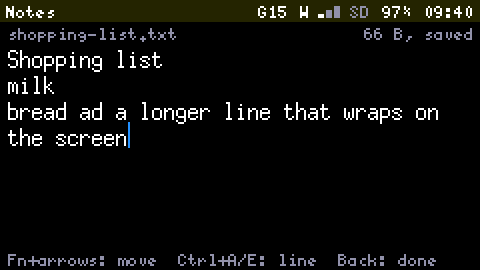
Notes are plain text files in /notes on the SD card. They are ordinary .txt files: you can read them on a computer too.
The list
Each note shows its first line and its date, newest first. s switches to sorting by file name.
| Key | Does |
|---|---|
| n | Starts a new note |
| Enter | Opens the note |
| r | Renames its file |
| d | Deletes it, after asking |
The editor
Type. Enter starts a line and Del deletes backwards. Fn with the arrow keys moves the cursor through the wrapped text, Ctrl+A and Ctrl+E go to the start and the end of the line, Tab types two spaces, and the compose key gives accents as everywhere.
There is no save key. The note is written five seconds after your last key, when you press Back, when you leave the App, when the screen turns off and before the device powers off. The top line says typing or saved.
Each save writes a temporary file and then puts it in the note's place, so a power cut costs a few seconds of typing and never the note. If a save was cut short, opening the note offers its copy back.
Names
A new note has no file until you type something. The file is then named after its first line (shopping-list.txt), or note-<date>-<time>.txt if that line gives no usable name.
Limits
A note holds up to 16 KB while it is edited. A bigger text file opens read-only in the Storage App; editing a file of any size is planned. In Storage, e on a text file opens it in the same editor, anywhere on the card, unless the file is read-only. Notes are never offered for deletion by the clean-up.