

Mesh
MeshCore on the Cardputer: the channels you follow, private conversations, and the nodes around. It listens by default, and sends once you choose.
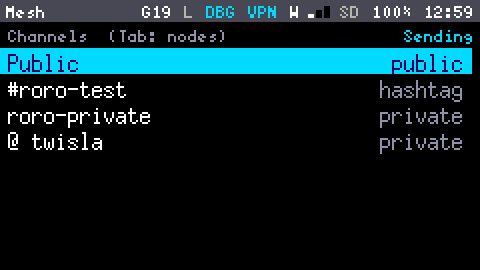
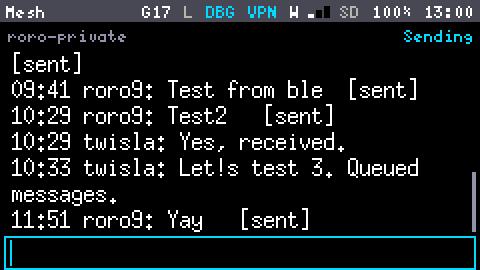
The Mesh App is MeshCore, the mesh heard most around here, on the Cap LoRa-1262. It reads channels and lists the nodes around, and once you let it, it sends: messages on channels, private messages with a receipt, and its own advert.
Settings → GNSS and radio → Mesh says how much it does:
| Mesh | Does |
|---|---|
| Off | Nothing: the radio sleeps unless the LoRa Scanner wants it |
| Listening (the default) | Hears the mesh in the background, whatever App is open and with the screen off. Transmits nothing |
| Sending | Listens, and sends. Needs the Region confirmed in Settings. The first time, the device makes its own key, and keeps it |
It uses MeshCore's European setting, "EU/UK (Narrow)": 869.618 MHz, 62.5 kHz wide, SF8, coding rate 4/8. The radio's L in the Status Bar shows it is listening, and flashes on each packet; the Mesh App says Sending at the top while it may send.
When the LoRa Scanner listens on another setting, or sweeps, it has the radio: the mesh is paused, sends nothing, and the Mesh App says so. On the MeshCore preset both hear the same packets.
Channels and conversations
The first view lists the channels you follow, then your private conversations (@ name), with how many new messages each has. Enter opens one, newest at the bottom.
| Kind | Is |
|---|---|
| Public | The channel every MeshCore node has. Its key is published: anyone can read it. Always there. |
Hashtag, #name | A channel whose key is worked out from its name: anyone who knows or guesses the name reads it. Follow one with a, typing # and its name. |
| Private | A channel with a secret key, which whoever made it shares. Follow one with a, typing its name, a space, and the secret as 32 hex digits. |
Eight channels at most, Public included; d stops following one. The name a message shows before the : is what its sender wrote: it isn't signed, and anyone can use any name.
A new message on a channel or a conversation that isn't open adds to its count, puts a dot after the L in the Status Bar, and shows as a Notification, silently: Settings → GNSS and radio → Mesh sound makes it sound like any other.
Sending
With Mesh on Sending, a channel or a conversation has a line to write in at the bottom: type, and Enter sends. 160 bytes at most, your name included on a channel (it is the Long name from Settings).
Your own messages say where they are:
| State | Means |
|---|---|
sending | Waiting for its turn: private messages go one at a time |
sent | On the air |
delivered | A private message the other node acknowledged |
failed | A private message with no acknowledgement after 3 tries, or still on its way when the mesh was switched off or a key imported. After the device restarts, one that hadn't gone yet comes back failed (one already on the air comes back sent). Ctrl+r sends the last failed one again |
heard repeated | A channel message a repeater was heard passing on |
A private message goes to a chat node in the node list: open its page and press m. Only that node can read it. The first one goes everywhere the mesh reaches (flood), and the answer tells the device the way to it: the next ones go straight there. Only nodes that have heard your advert can answer you.
A channel message has no receipt: anyone with the channel's key reads it.
Your advert
A node is known to the others by its advert: its name, its key and, if you say so, where it is, signed with its key. The device sends one by itself each time the mesh starts Sending, zero-hop: only nodes in direct range hear it, and no repeater passes it on. On the node list, a asks, then sends a flood advert, which every repeater in range passes on: the whole mesh around then knows your device.
Settings → GNSS and radio → Mesh position says what an advert gives of where you are: Not sent (the default), Exact, or Rounded to 0.01° (about 1 km). Without a GNSS fix it gives nothing.
Rules it keeps
- 10% of the air, at most. The band (869.4 to 869.65 MHz) allows a device to transmit 10% of any hour: 360 seconds. The device counts, and when the hour's share is spent, sending waits: the App says how many minutes. MeshCore paces itself well before that. Nothing can change the 10%: it is built into the firmware.
- +22 dBm, the radio's most, well within the band's 500 mW.
- No sending without the time (from Wi-Fi or a GNSS fix): adverts and messages carry it, and the mesh ignores a node that thinks it is 1970.
- It never relays other nodes' packets: it is a chat node, not a repeater.
Your key
The device's key is made on the device, kept in it (not on the card: changing cards changes nothing) and never shown. mesh key in the Shell shows its public half. To keep it across a full erase, mesh key export prints it and mesh key import <hex> takes one back: over USB or in the device's own Shell only, and only while the Debug Console is off (debug off first). Whoever has it can be your device on the mesh.
Nodes
Tab lists the nodes heard, most recent first: what kind each is (chat node, repeater, room server, sensor), how long ago it was heard and, when both it and the GNSS have a position, how far it is. Enter shows a node's page: its signal (RSSI and SNR), how many repeaters its advert came through, its position, and the distance and bearing to it.
A node is listed once its advert is heard and its signature checks out: a node sends one now and then, so a quiet mesh takes a while to fill the list. An advert older than the last one from the same node (a replay) and one whose signature fails (forged) are dropped. The device keeps the 24 most recently heard in memory, and all of them on the card.
Rooms
A room is a MeshCore room server: it keeps the posts of the members who log in, and sends each one what was posted while they were away. The device is a member, not a server.
- A room shows in the nodes once its advert is heard, marked
room. - On its page, press m. The first time, it asks for the room's password (shown as stars); once the room says yes, the device keeps it, and logs in by itself the next time the room is opened.
- The room's conversation then fills with its posts, each as author: text: the author named from the nodes, or by the first bytes of their key. Type and press Enter to post.
The header says whether you are in, logging in, refused, or not in; Ctrl + l asks for the password again. The device remembers the time of the last post it received, with the room's node, so after a restart the room only sends what is newer. The MeshCore app logs in to rooms through the device too.
What is kept, and where
Everything heard and sent goes to the SD card, in /mesh/, as plain text: nodes.log for the nodes, a file per channel, and dm-<key>.log per private conversation. Anyone holding the card can read them. Removing a channel stops following it; what it had stays on the card.
Without a card, or with a card over 90 % full, nothing is saved: the App says not saved, and keeps the newest messages in memory until the device restarts. The App shows the messages kept in memory, 50 a channel or conversation at most: older ones are on the card.
After a restart, the App reads its history back from the card: the newest messages of each channel, and of the 8 private conversations last written to, with your own messages' states (sent, delivered, failed). Messages sent from the MeshCore app are among them.
When memory is short (the VPN, IRC and an SSH session all open, say), the mesh waits to start, and the App says Waiting for memory.
In the Shell
| Command | Does |
|---|---|
mesh status | Listening, sending or paused; the device's key, name and what its adverts give; the hour's airtime; packets, adverts and messages |
mesh nodes | The nodes, with their signal, hops and position |
mesh channels | The channels followed, and their files |
mesh channel add #name / mesh channel remove <name> | Follows a hashtag channel, or stops |
mesh send <channel number> <text> | A message on a channel (mesh channels numbers them) |
mesh dm <key's start or name> <text> / mesh dms | A private message; the conversations |
mesh advert / mesh advert flood | The device's advert, zero-hop or flood |
mesh key | The device's public key |
mesh send on / mesh send off | Mesh: Sending, or back to Listening |
mesh rx on / mesh rx off | Each node and message on the console as it is heard |
mesh on / mesh off | Mesh: Listening, or Off |
The keys, as the device lists them
What Fn + h shows on these screens. These tables are generated from the firmware's own lists, so they are always the current ones.
Mesh, the channels
| ; . | up, down |
| Enter | read the channel or the conversation |
| a | follow another channel |
| d | stop following it |
| Tab | the nodes |
Mesh, a channel
| type, Enter | send it (Mesh: Sending) |
| alt ; . | older, newer |
Mesh, a private conversation
| type, Enter | send it (Mesh: Sending) |
| alt ; . | older, newer |
| ctrl r | send the last failed one again |
Mesh, the nodes
| ; . | up, down |
| Enter | the node's page |
| a | advertise this device to the whole mesh |
| Tab | the channels |
Mesh, a node
| ; . | scroll |
| m | a private conversation with it, or its room |
| Enter | back to the nodes |
Mesh, a channel to follow
| #name | a hashtag channel |
| name secret | a private one: 32 hex digits |