

IRC
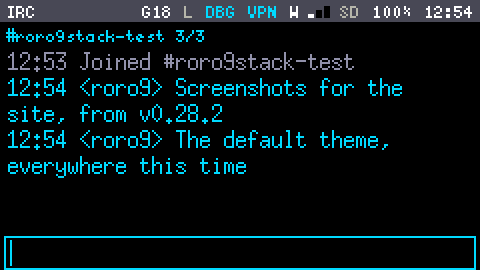
Chat on an IRC server from the keyboard, with a connection that outlives the App and daily logs on the SD card.
Connecting
The first time, type /settings and press Enter. The settings page has:
- Server and Port, and TLS (on or off).
- Self-signed: for a server whose certificate no authority signed. It is pinned on first use: the first certificate it sees is remembered, and a different one later is refused.
- Nick, SASL user and SASL password, NickServ password: passwords show only as
(set). - Auto-join: the channels to join after connecting.
- Save & reconnect.
Opening the IRC App connects, if Wi-Fi is up. The connection belongs to a background service: leaving the App does not disconnect, and new messages keep arriving and being logged. It reconnects by itself after a drop, and does not start by itself after a restart.
Chatting
You type at the bottom; Enter sends. A line starting with / is a command:
| Command | Does |
|---|---|
/join #channel [key] (or /j) | Joins; the # is optional |
/part [#channel] [message] | Leaves |
/msg nick text (or /query) | Opens a private chat, sending the text if there is any |
/me text | An action line |
/nick newnick | Changes your nick |
/topic [text] | Shows or sets the channel topic |
/names [#channel] | Lists who is there |
/uname | Shows the firmware, its version and the chip, in this buffer only: nothing is sent |
/quit [message] | Disconnects and stays disconnected until you type something again |
/raw … (or /quote) | Sends a line to the server as it is |
/settings | The settings page |
Anyone who asks the device for its CTCP VERSION (/ctcp roro VERSION in most clients) is told roro9stack and the firmware version.
Each server, channel and private chat is a buffer. Tab moves to the next one, each shows how many messages are unread, and your own lines are in the accent colour. Scroll back with Alt + ; (older) and Alt + . (newer). The up and down arrows (Fn + ; and .) recall lines you sent.
Mentions and the unread count
A message with your nick in it, or any private message, is a mention: it shows a Toast over whatever App is open, and counts in the Status Bar's [n]. Other traffic only adds to the buffer's unread count.
Logs
Every buffer is logged to the SD card, one file per day, under /irc. Logs stop when the card passes 90% full, to keep the rest for captures; nothing is deleted without your asking, in the Storage App's Maintenance.
Good to know
- IRC pauses while Wi-Fi is monitoring (the Status Bar shows
MON) and while the device installs an update. It reconnects and rejoins its channels afterwards; the App sayspausedin the meantime. - A secure connection costs memory: IRC's takes about 40 KB of the 107 KB the device has, and an update's download needs about 52 KB more. That is why IRC steps aside for an update, and why the daily update check waits for IRC to be disconnected (see Updates).
The keys, as the device lists them
What Fn + h shows on these screens. These tables are generated from the firmware's own lists, so they are always the current ones.
IRC
| Enter | send the line |
| Tab | the next buffer |
| Alt ; . | scroll back, forward |
| Fn ; . | lines you sent before |
| Fn , / | move the cursor |
| Del | delete backwards |
| /settings | server, nick, passwords |
| /join #x | join a channel |
| /part | leave it |
| /msg nick | a private chat |
| /me | an action |
| /nick | change your nick |
| /topic | see or set the topic |
| /names | who is there |
| /quit | disconnect, and stay so |
| /raw | a line as it is |
| ` | leave: IRC stays connected |
IRC settings
| ; . | up, down |
| Enter | edit, switch, or save |
| ` | leave without saving |
IRC, a setting
| Enter | keep it |
| ` | cancel |
| Del | delete backwards |
| Fn , / | move the cursor |