

Gemini
Browse Geminispace: follow links, go back, bookmark pages and keep them on the SD card to read offline.
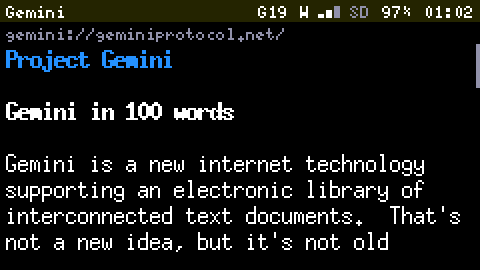
Gemini is a small, text-first protocol: pages are plain gemtext, served over an encrypted connection, from capsules instead of sites. It needs Wi-Fi.
Reading
| Key | Does |
|---|---|
| Tab / Shift+Tab | Picks the next or previous link |
| Enter | Follows the link |
| ` (Back) | Returns to the previous page, at the place where you scrolled to |
| Up and down | Scroll a line |
| Space | Pages down |
| g | Types an address |
| b | Bookmarks the page |
| s | Saves the page to the card |
| S | Saves it with the pages it links to |
Headings, lists, quotes and preformatted blocks are drawn as gemtext intends, wrapped to the screen. Links to other protocols show their address and are not followed. A page that asks for input (a search, say) shows a prompt, and a password prompt hides what you type. Characters outside the Latin fonts show as ?. The history keeps the last 20 pages.
The start page
It lists your bookmarks, then your Saved Pages, then a few starting points: geminiprotocol.net, a search engine and an aggregator. Without a card it shows only the built-in starting points.
Certificates: trust on first use
Most capsules sign their own certificate. The first certificate seen for a host is remembered; if it later changes, the page is not shown and you are asked whether to trust the new one, with both fingerprints on screen. Expired or self-signed certificates are fine: only a change counts. Client certificates are not supported.
Saved Pages
s keeps the page on the card, with the address it came from and when it was saved, and you can read it with no network. S also saves the pages it links to on the same capsule, as text only, up to 30, in the background. On the start page, Saved Pages are listed by capsule, newest first. Inside one, r refreshes it and d deletes it. A link to another saved page opens the saved copy; any other link fetches online if Wi-Fi is up, or says it is not saved. A file that is not text (a picture, say) is saved to /gemini/downloads/ instead of being shown. The Storage clean-up never offers Saved Pages for deletion.
Big pages and memory
With a card, every page streams to the card first, so a page larger than the device's memory still arrives whole and is read from the card as you scroll. Without a card, a page is limited to what fits in memory. If there is not enough free memory to open a secure connection, the fetch says so instead of failing silently; stopping IRC frees the most.