

TL;DR
- The SD card was never refusing writes. The framework's driver asked the card for its status one byte too early, got garbage, and reported an error. Two dummy bytes fixed it: 30 uploads of 1.7 MB in a row with no failure, against 3 in 10 before. Reported upstream as arduino-esp32#12970.
- Fixed IPv4 addresses, per network, for networks with no DHCP, plus DNS and NTP servers in Settings with public defaults.
- A System App: tasks, memory, network traffic per service and system state, live, in any build.
- What the System App found first: the main loop uses a whole CPU core at rest. Not fixed yet; it has an issue of its own.
- Three releases: v0.6.1, v0.7.0 and v0.8.0. The code is on my Gitea, and the plan with every measurement is docs/milestones/S1.md.
Why a housekeeping milestone
The radio milestone ended waiting for hardware: the mesh needs a second node, and I don't have one yet. It also left a card that failed about one upload in five, and a backlog of some twenty ideas I'd dictated into the issue tracker in one sitting.
So the backlog got sorted into milestones, and the first one is the boring kind: S1, system basics. The card can be trusted. The device works on any network. You can see what the system is doing. Nothing glamorous, all of it wanted before a radio starts writing to that card around the clock.
The cast
- The cardSamsung microSDHC, 8 GB, June 2013
- Thirteen years old, product name "00000", which is the most honest thing a memory card has ever said about itself. Accused for two days of refusing writes. Innocent.
- The driversd_diskio.cpp, 891 lines, from the Arduino framework
- Talks to the card over SPI. Gives up on a write without saying why, and tests for "ready" one byte before the card has had time to say "busy".
- The network10.39.39.0/24, gateway at .1
- The only one I have to test on, with exactly one device on it. Which makes 10.39.39.13 the safest free address in Brussels.
- The main loop100% of core 1, at rest
- Polls the keyboard, ticks the services, redraws when needed, and comes straight back for more. Has never once considered sitting down.
The card that never said no
The last post left it here: about once in five uploads, a write to the card failed, the retry code papered over the hole with zeros, and I'd fixed the papering but not the failing. The card "refuses a write now and then", I wrote, like it was weather.
Four wrong guesses
The radio. It shares the card's SPI bus, so it was the obvious suspect. Cleared in the last post: the failures came with the radio asleep too.
A timeout. The driver waits at most 500 ms for a busy card and then gives up, silently. Cards do pause for housekeeping. So I timed every write. Good ones took up to 107 ms. The failing one came back after 4 ms. Nothing waits 500 ms in 4 ms.
The bus speed. 20 MHz over wires that also run up into the radio's cap: maybe bits were getting flipped. At 10 MHz the uploads were 15% slower and one in ten still failed, after 7 ms this time. A failure that takes twice as long at half the speed is an exchange being rejected, not a signal problem.
A CRC bug. Reading the driver, I found something that looked like the answer. After each data block the card replies with one of three values: 0x05 accepted, 0x0B CRC error, 0x0D write error. The driver masks the reply so its lowest bit is always 1, then checks whether it equals 0x0A to decide to resend. It can never equal 0x0A. So a block the card rejects is never resent. A real bug, sitting in the framework for anyone to trip over. I was sure.
It wasn't that either.
Asking the driver
The driver fails without logging anything, so the only way to know was to make it talk. That meant owning it.
You can't just drop a file with the same name into the project: PlatformIO links the framework library's objects directly, and the linker complained about every function twice. What works is a project library with the same name, which takes the framework's place. So lib/SD is now my copy of the framework's SD library: committed once exactly as it ships, then with my changes on top, so the difference stays one readable commit.
It took three tries to build. I forgot the library's sixth file, the one with the CRC routines. Then my new code landed inside an extern "C" block and got the wrong name. The compiler was patient about it, in the way compilers are.
With a record of where each write gave up, twelve uploads produced four failures, all at the same step: every data block accepted, the write properly ended, and then the status check came back as 0xFF three times and 0x1F once. Those aren't status values. They're what a wire looks like when nobody's driving it.
One byte
After the token that ends a multi-block write, a card takes about one byte of clock before it signals busy. The driver deselects the card, selects it again, and reads a single byte to see if it's ready. Usually, by then, the card has raised busy and the driver waits. About once in 1,500 writes it hasn't yet: the byte reads 0xFF, "ready", and the driver asks for the card's status while the card is still writing. The reply is garbage, the driver calls it an error, and the filesystem is told the write failed.
It hadn't. The data was on the card every time. The check was wrong, not the write.
The reference SD driver that everyone copies from sends one dummy byte after selecting the card, with a comment saying why. The Arduino one doesn't. Two dummy bytes, one after the end-of-write token and one after selecting, and:
- 30 uploads of 1.7 MB in a row, each read back and checked by SHA-256: no failure.
- Ten of those with the radio listening on the same bus.
- Before: 3 failures in 10.
The CRC bug is still there, by the way. It's real, nothing here triggers it, and I don't fix code paths I can't test. It's written down, and it's in the report.
Telling upstream
A bug in a framework that thousands of projects use deserves a report, and a report deserves the card's make. Which I didn't know: the card is anonymous on the outside, and I had no other device to read it with.
The card knows, though. Every SD card carries an identity register: maker, product name, revision, serial number, date. So the firmware got an sd card command that asks, through the driver I now own:
sd card: SDHC/SDXC, 7.9 GB, Samsung (0x1B) "SM" "00000" rev 1.0, serial …, made 2013-06A Samsung from 2013 whose product name is five zeros. It went into the report with the measurements, the two-line fix and the second bug: arduino-esp32#12970. No reply yet. Until a fixed release exists, my copy has to be kept in step with the framework by hand, which is the price of the fix and has an issue to keep me honest.
Networks that don't hand out addresses
Not every network has a DHCP server: a lab bench, a direct cable to a router, a network where someone assigns addresses from a spreadsheet. Until now the Cardputer couldn't join any of them. Twelve questions settled how:
- Per network. Each saved network is Automatic or Fixed. The right address at home is the wrong one at work.
- A prefix, not a mask. Typing
24beats typing255.255.255.0on this keyboard, and it can't be malformed. - The gateway is optional. A bench network with no way out is a legitimate network.
- DNS and NTP are global, with public defaults: 9.9.9.9 then 1.1.1.1 for names,
pool.ntp.orgthentime.cloudflare.comfor time. A switch, "Always use my DNS", covers networks whose resolver you'd rather not trust. - IPv4 only. IPv6 was offered as a "later"; I said not even that.
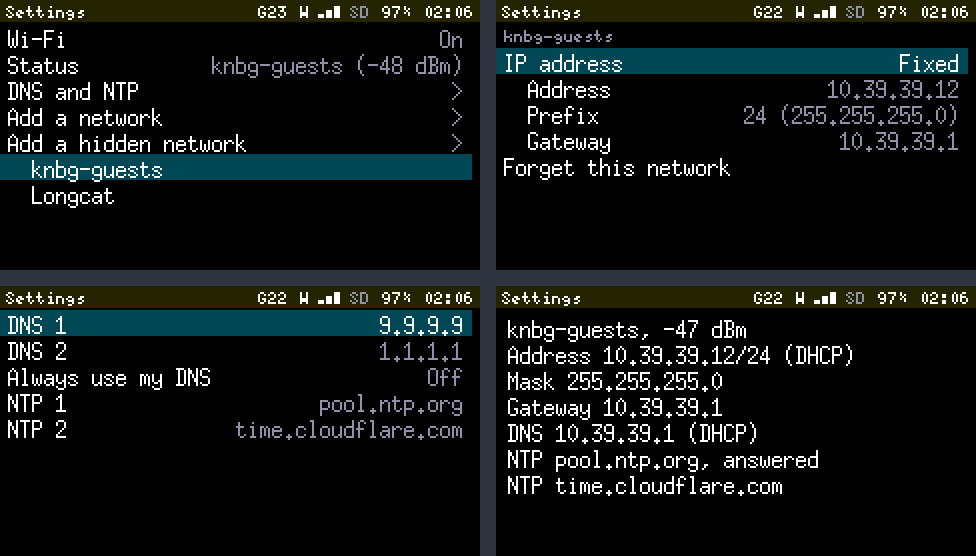
Enter on a saved network used to ask "Forget network?", which was a rude thing to ask first. Now it opens the network's page. Switch it to Fixed and the page fills in the address, prefix and gateway the network is giving you right now, since the commonest reason to want a fixed address is to keep the one you have. Nothing is applied until you leave the page, so a half-typed address is never used.
What's typed gets checked, in code tested on the PC, with a reason for every refusal: "10.39.39.0 is the network's own address", "The gateway 10.39.40.1 isn't in 10.39.39.0/24".
A safety net for remote hands
There's a catch in testing this over Wi-Fi: a wrong address cuts the branch you're sitting on. The Debug Console and updates both come over that connection.
So Debug Builds got a trial: wifi ip … try 60 applies a setting and goes back to the previous one after 60 seconds unless confirmed. Then I gave it a deliberately wrong gateway. The device went silent, and a minute later it was back, unassisted. Without the trial, someone would have had to pick the device up and fix it on its own keyboard.
Two things the network stack does behind your back, found by reading and avoided by checking every 30 seconds:
- A DHCP renewal quietly puts DHCP's DNS servers back.
- It also clears every NTP slot it didn't fill itself.
And one I caught before it ran: my first version treated "just connected" like "the settings changed", and would have rejoined the network forever to fetch DNS servers it already had.
Tested on the only network I have: fixed at 10.39.39.12, then 10.39.39.13 (the device is alone there, so the neighbouring address was free by definition), internet working through the configured DNS both times, back to DHCP, and both NTP servers answering. Not tested, and written down as such: NTP servers offered by DHCP, because mine offers none.
What the system is doing
Every milestone so far ran on measurements that needed a Debug Build and a laptop: memory floors, stack sizes, TLS dips. The System App puts them on the device.
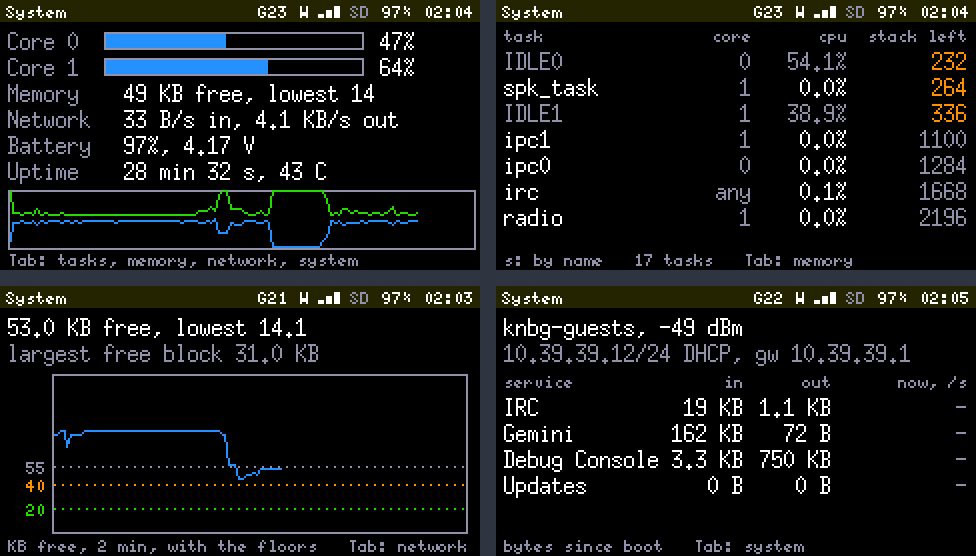
Five views, Tab between them. It samples once a second, keeps two minutes of history, and keeps nothing at all while it's closed.
Memory draws free heap against the three floors from the Gemini milestone. The screenshot shows IRC connecting over TLS: 25 KB gone in a second. The graph only bottoms out near 50 KB, but "lowest 14.1" says the handshake went far deeper between two samples. Right after that I asked for a Gemini page, and the firmware refused: "Not enough memory (44 KB free): stop IRC or retry". That's the start floor from two milestones ago doing its job, and the first time I've seen the cause on the device's own screen while it happened.
Network counts bytes per service. That took one small wrapper class around each service's connection instead of a dozen edits. It counts in the two calls everything else goes through. The counts are exact: fetching a 164,970-byte Gemini page counted 164,986 bytes in, which is the page plus its 16-byte header line, and 42 out, which is a 40-character URL and a line ending.
Tasks flags anything with under 512 bytes of stack left. Three tasks qualify today, all the framework's own, one of them with 232 bytes. I've chosen to find that reassuring.
The loop that read 2%
The Tasks view shows each task's share of a core over the last second. On its first honest run it showed the main loop at 2%, core 1's idle task at 0%, and core 1 at 100% load. Ninety-eight percent of a core, belonging to nobody.
FreeRTOS adds to a task's run-time counter at the moment the task is switched out. The main loop is the task taking the sample. When nothing else wants its core, it's never switched out, so its counter stands still while it runs flat out. The fix is arithmetic: the task doing the sampling gets whatever is left of its core once everything else is counted.
The console's tasks command had its own version of this. My first rewrite took two samples a quarter of a second apart, inside the command, and reported the loop at 1%. Of course it did: the loop was asleep, waiting for the command to finish measuring it. It now takes one sample, lets the loop run for a second, and prints after the second.
With both fixed, the figure is plain:
task             st   pri  stack   cpu% core
loopTask         R      1   2872  100.0 1
IDLE1            r      0    352    0.0 1
load: core 0 2 %, core 1 100 %
The main loop uses a whole core at rest. It polls, ticks, redraws and comes straight back, forever. An hour earlier I'd measured it at 81%, which was an average since boot, hobbled by the same counter. It's a battery cost, a heat cost, and a suspect for the radio noise from the last post. It's also not fixed: letting the loop sleep touches key response, redraw timing and every service's tick, so it gets its own issue and its own measurements. The monitor's job was to make it impossible to ignore, and it did that in its first minute.
By the numbers
| Releases | 3: v0.6.1, v0.7.0, v0.8.0 |
| Design questions | 23 (Q105 to Q127) |
| Tests | 396, 31 of them new |
| Firmware | 1.74 MB of 3.3 MB, 35 KB more than v0.6.0 |
| Wrong guesses about the card | 4 |
| Bytes missing from the driver | 2 |
| Uploads without a failure since | 30 of 30 (it was 7 of 10) |
| A failed write, before | every 1,500 or so |
| Free address used for testing | 10.39.39.13 |
| Seconds cut off by a wrong gateway, on purpose | 60 |
| Bytes miscounted in a 164,970-byte fetch | 0 |
| Share of a core the main loop uses at rest | 100% |
Where it stands
-
M0 and M1: the skeleton, Wi-Fi, IRC, Wi-Fi Tools.v0.1.0 to v0.2.1, the first post. -
Updates and debugging over the air.v0.3.0, Look, no cables. -
M2: GNSS.v0.4.0, Seventeen satellites. -
G1: Gemini.v0.5.0, A browser in the RAM IRC left over. -
M3: the LoRa radio, listening.v0.6.0, The loudest thing it hears is itself. -
S1: the card, fixed addresses, the System App.v0.6.1 to v0.8.0, this post. -
Next: the main loop learns to rest, and the radio noise gets hunted with the tools that now exist. M4, the mesh, still waits for a second node.
The card was innocent, the network was simple, and the monitor's first finding was about its own author. A good milestone for humility, and for a 13-year-old memory card with no name.