

TL;DR
- Firmware Updates without a cable.
scripts/flash.sh --ota <ip>builds, signs and pushes a new firmware over Wi-Fi. Dropping the file on the SD card works too, and so do two more ways that don't need anyone to touch the device. - Only my firmware gets in. Every Update File carries an ECDSA P-256 signature over its header, which includes the image's SHA-256. Bad signatures are refused before a single byte is written; corrupted images when their hash doesn't match.
- A bad update undoes itself. New firmware runs on Probation until it has been up 30 s, drawn the screen and reconnected Wi-Fi. If it crashes before that, the bootloader boots the previous one, which says so.
- Debug Builds add a Debug Console over Wi-Fi: live logs, every serial command, files on the SD card, screenshots, crash reports with decoded backtraces, and full core dumps. Release builds compile none of it.
- Safe Mode for firmware that was confirmed and crashes anyway: after 3 crash restarts in a row, only Wi-Fi and updates start, so a fix can still get in.
- On the way, the device lied to me three times: about rolling back, about which firmware had failed, and about its watchdog. Details below.
- The code is public on my Gitea, tagged v0.3.0.
Why bother
The previous post ended with the Cardputer on Wi-Fi and IRC, and every change still flashed over USB. My dev box is a VM, and its USB passthrough has a hobby: every so often, flashing fails with OSError: [Errno 71] Protocol error, retrying never helps, and only unplugging the Cardputer does. Moving the device to put it into download mode also moves the serial port to a new name, and sometimes out of the VM altogether.
So the goal was not just "update over the air". It was manage it over the air: install, recover, and find out what went wrong, all from the sofa. A device that can take an update but can't tell you why the last one crashed is only half-managed.
The cast
- The Cardputer ADVESP32-S3, 8 MB flash
- Two 3.3 MB app slots, so one can run while the other gets overwritten, and a 64 KB core dump partition, which turned out to be the most useful 64 KB on the chip.
- The bootloaderESP-IDF 5.5.5, prebuilt
- Rolls back an update that crashes before it's confirmed. I spent a day convinced it didn't. It was never asked.
- The key pairECDSA P-256
- The public half is compiled into the firmware. The private half lives in
~/.config/roro9stack/and has never been within a mile of git. - The dev boxa VM with Docker
- Builds everything in a container and reaches the Cardputer over a routed network, so mDNS doesn't make it across and everything is addressed by IP. Its USB passthrough is the reason this post exists.
An Update File, and who's allowed to write one
The ESP32 has hardware Secure Boot. It's enforced by the chip and burns eFuses, one way: a mistake bricks the device, and it can never run unsigned code again. On a single development board, I'd like my mistakes to stay reversible, so the firmware checks signatures itself (ADR 0003). Someone holding the device can still flash anything over USB; someone on the network can't.
An Update File (.ota) is a 160-byte header and the firmware image:
The device never holds the whole file. A streaming parser takes the header, checks the signature with mbedTLS against the public key compiled in, then writes the image into the app slot that isn't running, hashing it on the way. Only if the hash matches does it make that slot the next boot. Downgrades are allowed, and labelled as such, because sometimes the old version is the one that worked.
Like everything else in this project, the parser was written test-first and runs on the PC. Something that isn't an Update File, a bad signature, a tampered version, a corrupted image, a truncated file, trailing bytes, an image too big for the slot: each has a test that expects a refusal. The forged and oversized ones are refused before anything is written; the damaged ones are aborted, and their slot is never made bootable.
Four ways in
Over Wi-Fi. The device listens on TCP 3232 whenever Wi-Fi is up, and announces itself as roro9stack-2fa4.local (the suffix comes from its MAC address). mDNS doesn't make it across my VM's routed network, so in practice it's the IP. The push script streams the file and waits for an answer: the device replies OK v0.3.0 as soon as the image size announced in the header has arrived, and hangs up mid-transfer on a refused header, which the script reports instead of printing a Python traceback. After a successful install the device restarts, but waits up to 60 s if you're typing. Nobody likes an IRC message eaten by a firmware update.
From the SD card. Settings → Firmware lists the .ota files in /updates and installs one after a confirmation:
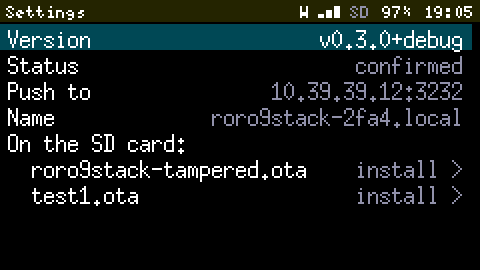
Over USB serial, card in. For when Wi-Fi isn't set up yet: scripts/sd_put.sh file.ota copies the file into /updates through the serial console. The ESP32-S3's USB serial driver drops bytes when its receive buffer is full, so the protocol is stop-and-wait: 1 KB chunks, each acknowledged once it's on the card, and a SHA-256 check before the .part file is renamed into place. That's 55 KB/s, or 30 s for 1.6 MB. Slow, but it beats walking to the device.
Over the Debug Console. In a Debug Build, rdbg.py put sends the file over Wi-Fi at about 300 KB/s and rdbg.py install /updates/… starts Update from SD remotely. It's the SD card path, without anyone touching the SD card.
Probation, and the rollback that never was
A firmware that installs fine can still fail to boot. So new firmware runs on Probation: it's confirmed only once it has been up 30 s, drawn a frame, and reconnected to Wi-Fi if Wi-Fi is configured (it gets 3 minutes for that). Fail any of it, or crash first, and it goes back to the previous firmware, which is still in the other slot.
Testing this needs a firmware that crashes on purpose. A build flag adds if (millis() > 5000) abort(); to the main loop, the build gets signed and pushed, and the device should come back on the old firmware with a Toast saying so.
It didn't. It crashed every 5.5 seconds, forever, until I put it in download mode by hand and reflashed it over USB, cable, VM, Errno 71 and all. The conclusion seemed obvious: the bootloader PlatformIO flashes doesn't support rollback, even though the app's configuration enables it. So I wrote a second line of defence in the firmware, bootGuard(), which counts unconfirmed starts in NVS and rolls back on the second one. I also wrote an architecture decision record explaining that the bootloader can't roll back. With the confidence of a man who hasn't checked.
It crash-looped again. So this time I read the OTA state straight out of flash:
otadata 0  seq 0x1  state 0xffffffff
otadata 1  seq 0x2  state 0x2
Lie number one. State 0x2 is ESP_OTA_IMG_VALID. The crashing image, which had never once lived 30 seconds, was marked valid. Neither the bootloader nor bootGuard() had anything to roll back: as far as they could tell, the update had been a success.
The culprit is Arduino-ESP32's start-up code. Before setup() even runs, initArduino() checks for a freshly installed image and marks it valid on the spot, unless the sketch overrides a weak function called verifyRollbackLater() to return true. The bootloader had been doing its job all along. It just never got a chance: by the time my code ran, the evidence had been signed off.
The fix is one line. My first attempt didn't work either:
$ xtensa-esp32s3-elf-nm -C firmware.elf | grep verifyRollbackLater
420383a4 t _GLOBAL__sub_I__Z19verifyRollbackLaterv
42104d5c W verifyRollbackLater
That W is Arduino's weak default, still the one linked. Mine had compiled as a C++ function, _Z19verifyRollbackLaterv, a different name entirely, so nothing replaced anything. No Arduino header declares it, so nothing told the compiler it should be C. Two words fixed that:
// Arduino-ESP32 marks a new image valid before setup() unless this returns true. Probation
// (UpdateService::tick) decides instead, and an unconfirmed image stays PENDING_VERIFY.
extern "C" bool verifyRollbackLater() { return true; } // C linkage, or the weak default winsNow nm shows a capital T, and the next test reported a failed update, which sounds right until you notice who said it. Lie number two: the crashing image had been built with the same version string as the good one, the Update File carried a different one, and at boot the firmware reports a Rollback when the version it was told to expect isn't its own. So the crashing firmware, alive for its 5 seconds, announced its own failure. Every test build now gets a version of its own. And then, finally:
  6.2 abort() was called at PC 0x4203849e on core 1
  7.2 roro9stack v0.2.1-9-g7afe6b7 ready
  7.2 notification: Update to v0.2.1-9-g7afe6b7-dirty failed, back on v0.2.1-9-g7afe6b7
One crash, and the very next boot is the previous firmware, saying so. bootGuard() stays, demoted to second line, and the decision record now says the opposite of what it said that morning.
A console with a network cable it doesn't have
Updates were only half the goal. The other half was being able to look inside a device that's on a shelf across the room. That's what a Debug Build is for: scripts/flash.sh --debug builds the same firmware with -DRORO_DEBUG, a +debug suffix on its version, and a Debug Console on TCP 2323 (ADR 0004).
Release builds don't have a disabled console. They have no console at all: the code isn't compiled in. Something that injects keys and reboots the device over the network is a remote control, and a remote control in a release build is just a vulnerability with good documentation.
A client must send a token as its first line: 128 random bits, made by the first build, kept in ~/.config/roro9stack/ with the signing key, passed into the build container and never committed. A Debug Build refuses to compile without one, rather than fall back on a default. Then the client gets the last 6 KB of console output (so boot messages aren't lost just because nobody was connected), every new line live, ESP-IDF's own log lines included, and the same commands as the serial port. One client at a time keeps the memory cost flat: 6 KB for the ring, 6 KB of task stack.
The PC side is scripts/rdbg.py:
$ scripts/rdbg.py info
firmware: roro9stack v0.3.0+debug
uptime: 0h00m36s, last start: restart
heap: 90148 free, 67388 lowest, 42996 largest block
chip: ESP32-S3 rev 2, 240 MHz, 40.3 C
wifi: knbg-guests, ip 10.39.39.12, rssi -53 | sd: present
update: confirmed
slot app0: v0.3.0+debug, running, boots next, valid
slot app1: v0.2.1-14-g388e847+debug, valid
Those slot versions come from NVS, not from the images: the prebuilt framework stamps its own version on every image, so the firmware writes down which version went into which slot, at boot and at every install.
Every command
| Command | Does |
|---|---|
info | Firmware, uptime, last restart reason, memory, Wi-Fi, both app slots |
tasks | Every FreeRTOS task: state, priority, lowest free stack, CPU share |
crash | The last crash: which firmware, why, task, PC, backtrace |
reboot, boot other | Restart, or restart into the other slot (a manual Rollback) |
log level <0-5> | ESP-IDF's log level, at runtime |
ls, rm, install <path> | Files on the SD card, and Update from SD |
key <name> | Presses a key: drives the UI from the PC |
wifi status, irc dump, … | Everything the serial console already had |
get, put | Files to and from the SD card, about 300 KB/s (console task) |
screenshot | The screen, as a PNG on the PC (console task) |
coredump get | The raw core dump, decoded on the PC (console task) |
reset | Restart at once, even with the main loop stuck (console task) |
crash abort, crash wdt | Crash on purpose, or hang the main loop (Debug Builds only, obviously) |
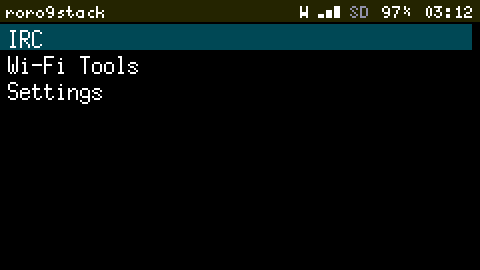
screenshot is my favourite, for a petty reason: the UI already composes every frame in a 32 KB off-screen buffer (8-bit colour, to save RAM), so the console task just sends that buffer as it stands. No extra memory, and rdbg.py turns it into a PNG without a single image library, because PNG is zlib plus four CRCs and I was feeling stubborn. Every screen in this post came from it, the Firmware page above included, after key down × 13 to get there.
A console that waited for nobody
The first remote tasks command printed its header, then one line every few seconds, interleaved with other tasks' messages. The main loop was crawling. The Cardputer was plugged into the VM, which wasn't reading the serial port, and when a USB host is attached but not reading, Arduino's USB serial driver retries each write 20 times with a 100 ms timeout. That's up to 2 seconds per line, on the main loop. A device that freezes because nobody is reading its debug output is the opposite of a debugging aid.
So the console now writes to USB only when the transmit buffer has room for the whole line (console.cpp), and never waits. The ring keeps everything anyway.
When it crashes anyway
ESP-IDF already writes a core dump to its flash partition when the firmware panics. Nobody was reading it. Now, first thing at every boot, the firmware writes down which version is running. After a crash restart, that record says which firmware crashed, even if a Rollback has switched slots in between. The firmware prints the core dump's summary and raises a Notification. And every build keeps its ELF in .pio/elves/, named by version and by the first digits of its SHA-256, the same digest the core dump records for the firmware that crashed. So the PC can decode a crash from any build, even one that's been rebuilt since:
$ scripts/rdbg.py crash
crash: last one in v0.3.0+debug (panic)
crash: task loopTask, pc 0x4037e231, cause 0, address 0x00000000
crash: reason: abort() was called at PC 0x4203a486 on core 1
crash: backtrace 0x4037e231 0x4037e1f9 0x40385691 0x4203a486 0x4203b389 0x4203b78b 0x4205269c 0x4037f211
crash: elf sha256 422a68a36

using .pio/elves/v0.3.0+debug.422a68a36fb990f3.elf
0x4037e231: panic_abort at esp-idf/esp_system/panic.c:477
0x4037e1f9: esp_system_abort at esp-idf/esp_system/port/esp_system_chip.c:87
0x40385691: abort at esp-idf/newlib/src/abort.c:38
0x4203a486: runCommand(String) at /work/src/main.cpp:390
0x4203b389: remoteCommands() at /work/src/main.cpp:494
0x4203b78b: loop() at /work/src/main.cpp:541
0x4205269c: loopTask(void*) at framework-arduinoespressif32/cores/esp32/main.cpp:82
That one was me typing crash abort, and main.cpp:390 is exactly the line that called abort(). For the cases where a backtrace isn't enough, rdbg.py coredump fetches the whole dump over Wi-Fi and runs esp-coredump with GDB against the same ELF: registers, every task's stack, the lot. The toolchain container already had both. It just needed someone to ask.
Safe Mode
Rollback protects against new firmware. It does nothing for firmware that was confirmed and crashes later: a corrupt setting, an IRC server sending something unexpected, a bug that takes an hour to show. Without a cable, that device restarts forever. So every build, release included, has a lifeboat (ADR 0005):
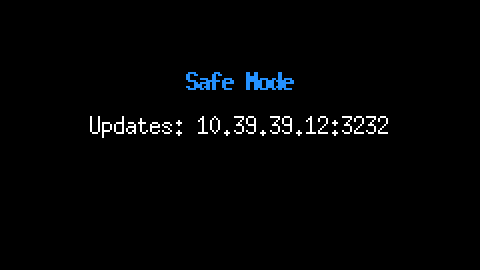
The first proper test of it went better than planned, and worse. My test script crashed the device three times, then kept asking for info to see whether it was back. In Safe Mode, info asks the Storage Service how the SD card is doing, and Safe Mode never starts the Storage Service, whose lock was only created by start(). Null mutex, assert, panic, Safe Mode again, info again. The script was patient. When I looked:
roro9stack v0.2.1-12-g0fb7f4e-dirty+debug in SAFE MODE: 29 crash restarts in a row.
crash: reason: assert failed: xQueueSemaphoreTake queue.c:1709 (( pxQueue ))
The bright side: between crashes, Safe Mode served the Debug Console every time, the crash report pointed straight at StorageService::state(), and the fix (create the lock in the constructor) went in over Wi-Fi, into the device in Safe Mode. It installed, restarted into normal mode, and confirmed on Probation. That's the whole feature, tested by accident, in the worst case available. Twenty-nine crashes, zero cables.
The loop nobody watched
To test the watchdog, crash wdt spins the main loop forever. The device should panic within 5 s and restart. It didn't come back. Four minutes later it still hadn't, and the Debug Console accepted connections but ran nothing, because every command is queued for a main loop that was busy doing for (;;) {}.
Lie number three: the task watchdog was on, but Arduino-ESP32 only watches the idle task on core 0. The main loop runs on core 1, unwatched. A stuck main loop was a frozen device, permanently, with a screen showing whatever it showed last. That one fix is now in every build:
enableLoopWDT()at the end of setup: a main loop stuck for 5 s panics, leaves a core dump and counts towards Safe Mode. Retested: back on Wi-Fi in 15 s, with a backtrace pointing intorunCommand(), at the command that was spinning.- An installed update no longer depends on the main loop to restart into it: the Update Service does it by itself after 90 s.
resetis answered by the console task, not queued, so it works when nothing else does.
Smaller bruises
- 220 KB for one line.
FileReceiver, the logic behindsd put, parsed its arguments withstd::istringstream. That pulled libstdc++'s iostreams and locales into the firmware: 220 KB of flash, to split a string on spaces. A ten-line loop does it now, and the feature costs 7 KB. - Binary read as commands. When a
putfailed halfway, the rest of the file kept arriving and the console read it as command lines. Random bytes can spellreboot. A failedputnow hangs up. - A card that fails one write. One upload failed at 1.3 MB with a zero-byte write, the next four went through. FATFS keeps a file in error after one failed write, so
putnow closes the file, cuts it back to the last good byte, reopens it and retries, up to three times. The retry hasn't fired since, which is either good news or a test I haven't managed to run. - A race in the waiting room. A card job queued from the console task waits for the storage task, and gives up after 5 s if there's no card. If the job started at the exact moment the wait gave up, it would have written into a stack frame that no longer existed. One compare-and-swap now decides which side wins.
By the numbers
| Commits from v0.2.1 to v0.3.0 | 14, over about a day |
| Lines added | about 3,600, 530 of them tests |
| Tests | 293, all on the PC |
| Release firmware | 1.62 MB of a 3.3 MB slot |
| Debug Build | 1.63 MB, and about 12 KB more RAM |
| SD card over USB serial / over Wi-Fi | 55 KB/s / 270–380 KB/s |
| From a hung main loop back to Wi-Fi | 15 s |
| Crash restarts in a row, record | 29 |
What it doesn't do
- Safe Mode can't save a firmware whose Wi-Fi is what crashes. Then it's USB again.
- The Debug Console is plain text. Fine on my network, not something to expose to the internet. The token keeps neighbours out, not eavesdroppers.
- Two paths haven't been seen working: the card write retry, and the Update Service restarting by itself after 90 s. Both are written; neither has fired since.
- Once, the USB serial console went silent in both directions after an upload, with Wi-Fi still fine. I couldn't make it happen again. If it does, the Debug Console will be watching.
- No pulling updates from Gitea releases yet. The device is pushed to, never pulls.
Where it stands
-
Signed Update Files, push over Wi-Fi, Update from SD, Probation and Rollback.Done, and the Rollback finally rolls back. -
Debug Builds and the Debug Console: logs, commands, files, screenshots, crash reports and core dumps over Wi-Fi.Done. -
Safe Mode, crash records, and a watched main loop, in every build.Done, and tested harder than intended. -
Next for roro9stack: GNSS, then the LoRa radio. With a cable plugged in only for charging.
The Cardputer now sits on a shelf across the room. It gets its updates over the air, and when something breaks, it tells me what and where. The USB cable is in a drawer, which is where it belongs.